Revit Detail Libraries: Container Models vs. Cloud Libraries vs. AI Search
Every engineering firm eventually reaches the same point: its detail library becomes too large to manage efficiently. What begins as a handful of organized drafting views slowly grows into thousands of details spread across container models, Windows folders, BIM 360 projects, and old Revit files. Engineers then spend valuable time searching for information that already exists instead of focusing on design work. The challenge is not creating good details. It is finding the right detail when it is needed.
A firm’s detail library represents years, and often decades, of engineering knowledge. Standard installations, equipment connections, coordination solutions, and lessons learned from past projects all become part of that library. Without an effective Revit detail library, firms often experience duplicate drafting views, engineers recreating existing details, outdated standards being reused in new projects, lost knowledge when employees leave, and hours wasted searching across multiple locations. For many firms, improving Revit content management can save hundreds of engineering hours each year.
For many MEP and structural firms, the traditional container model remains the foundation of detail management. A container model stores drafting views, schedules, families, and standard content inside one or more dedicated Revit projects. Engineers browse the Project Browser and import the views they need into active projects. This approach works well because it stays inside Revit, requires no additional software, and is familiar to most BIM managers. It also makes it relatively easy to maintain a set of standard drafting views.
The challenge with a container model Revit workflow is that it becomes harder to manage as the library grows. Large firms may accumulate thousands of drafting views, inconsistent naming conventions, multiple versions of the same detail, and limited search capabilities. Even when the correct detail exists, an engineer may not know what it is called or where it is stored. Container models remain a strong foundation, but they often need additional tools to remain efficient at scale.
Some firms take a simpler approach by storing entire Revit files in Windows folders. These folders may be organized by discipline, equipment type, CSI division, project type, or manufacturer. This method is inexpensive, easy to understand, simple to back up, and available without an internet connection or additional licensing.
However, Windows folder libraries depend heavily on filenames and folder structures. Engineers often need to open multiple Revit files before finding the correct detail. Over time, duplicate content and version-control problems become more common, and there is usually no easy way to preview individual drafting views before opening a model. This method can work for smaller firms, but it becomes difficult to scale as the number of projects and details increases.
Autodesk BIM 360, now part of Autodesk Construction Cloud, provides another option for centralizing Revit content. Many firms already use the platform for project collaboration and choose to store standards, container models, and detail libraries there as well. BIM 360 offers cloud accessibility, centralized file storage, permissions, version history, and strong integration with Autodesk workflows.
Although BIM 360 is an effective document and project management platform, it was not designed specifically as a Revit detail library. Finding an individual drafting detail often still requires browsing folders, opening models, and knowing where the content is stored. For firms already using Autodesk Construction Cloud, it can be a reliable location for storing detail libraries, but it may not fully solve the problem of fast, precise detail retrieval.
Dedicated cloud detail libraries offer a more specialized approach to Revit detail management. Platforms such as Pirros are designed to help firms index, organize, and search engineering details using metadata, tags, and AI-assisted search. Compared with traditional folders or container models, these tools can make a firm’s accumulated knowledge significantly easier to discover.
Cloud detail libraries are especially useful for firms that want a more structured, enterprise-level knowledge management system. They can improve search, standardization, collaboration, and access across teams. The tradeoff is that implementation may require firms to upload or index existing libraries, maintain a cloud-based system, train users on a new workflow, and occasionally move between Revit and an external application.
The newest category of Revit content management combines traditional workflows with AI-powered search. Details is designed to work with a firm’s existing detail libraries while allowing engineers to search naturally from inside Revit. Instead of relying entirely on filenames or folder structures, an engineer can search for phrases such as “cooling tower piping detail,” “pump isolation detail,” or “wall penetration for ductwork.” The software can also help users organize related content, such as creating a folder of details for a particular project or equipment type.
This approach focuses on reducing workflow disruption. Engineers can continue using familiar Revit content while gaining access to natural-language search, detail sharing, firm-wide organization, and cloud-based access. Because the search and reuse process happens inside Revit, adoption may be easier for teams that do not want to rely on a separate web-based workflow.
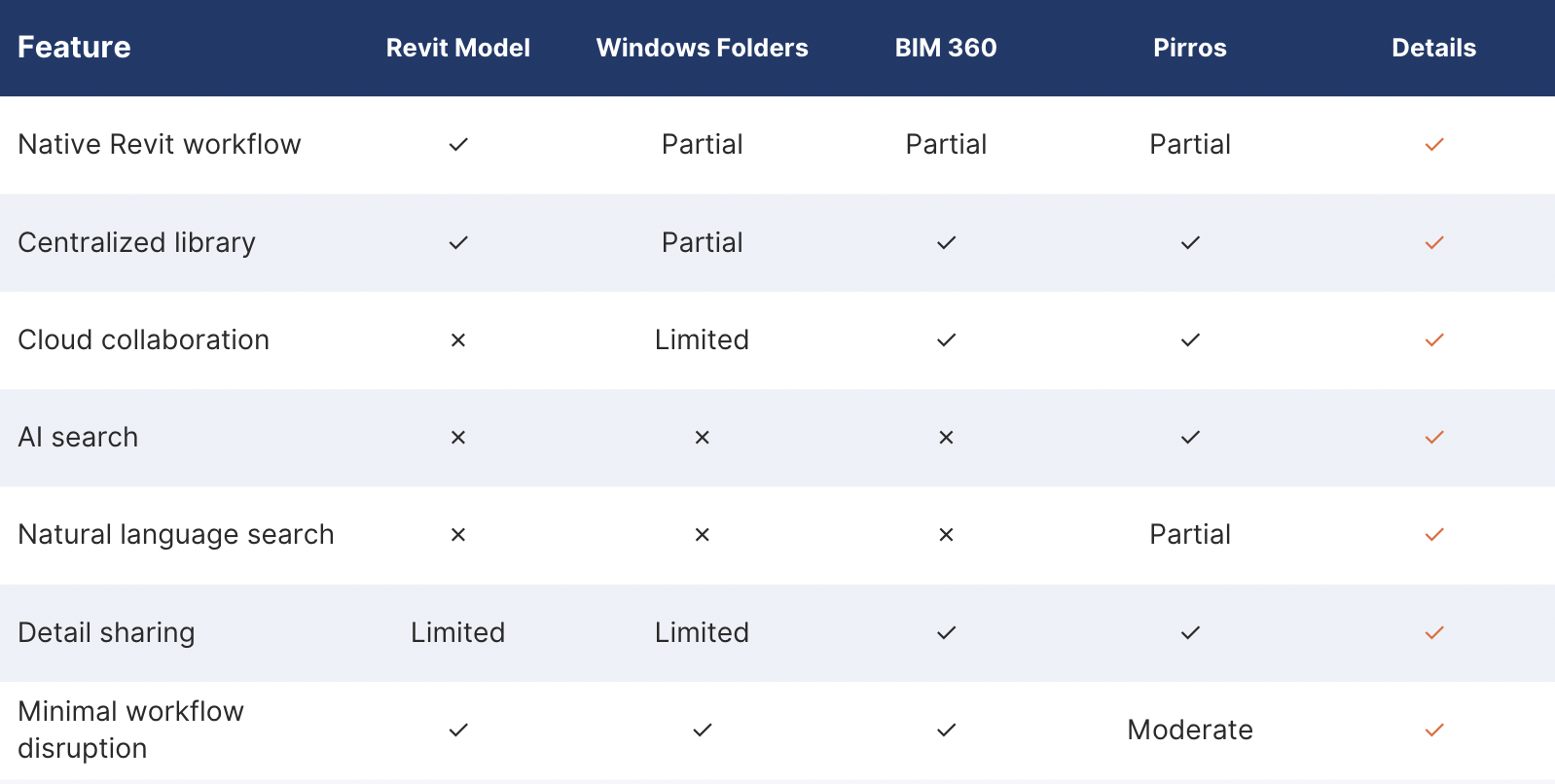
Each detail management method has a place depending on the size, structure, and goals of the firm. Traditional container models remain an excellent choice for smaller or well-organized libraries managed by experienced BIM staff. Windows folders provide a simple and inexpensive solution, but they become less efficient as content grows. BIM 360 and Autodesk Construction Cloud offer dependable centralized storage and collaboration, although they are not specifically designed for rapid detail search. Dedicated cloud platforms such as Pirros provide advanced search and knowledge management capabilities for firms that want a more structured system. AI-powered platforms such as Details combine modern search with a familiar Revit workflow, helping engineers locate and reuse details without leaving the software they already use each day.
There is no single best Revit detail management system for every firm. The right solution depends on the size of the library, the number of users, existing Autodesk infrastructure, BIM management resources, and how much workflow change the firm is willing to introduce. In many cases, the best system may not completely replace container models, Windows folders, or BIM 360. Instead, it may make the content stored in those systems easier to search, organize, and reuse.
Engineering firms have spent decades building valuable detail libraries. The challenge is no longer creating great content. It is making that knowledge instantly accessible. As AI becomes a larger part of everyday engineering workflows, Revit detail libraries will likely move beyond folders and filenames. Engineers will no longer need to ask which file contains a particular detail. They will be able to search based on the design problem they are trying to solve.
Instead of browsing through a long project list, an engineer may simply ask, “Show me the best chilled water pump connection detail we have used before.” That shift from basic storage to intelligent knowledge retrieval is likely to define the next generation of Revit content management.
Details is an AI-powered Revit plugin that helps engineering firms organize, search, share, and reuse drafting details without disrupting their existing workflows. Whether a firm currently relies on container models, Windows folders, or cloud storage, Details is designed to make its Revit detail library faster and easier to use from inside Revit. Visit firmdetails.com to learn more or request a demo.