A Revit Detail Management Tool for BIM Managers
BIM managers are responsible for making Revit standards work across an entire firm. That often means maintaining container models, managing Revit detail libraries, controlling access to approved content, and making sure engineers and designers are pulling information from the correct source. The problem is that even a well-organized BIM library can break down at the last mile: every employee still needs to know where the library is, connect to it correctly, and continue using the right source as firm standards change.
Details is designed to eliminate that problem.
Details is a Revit detail management platform built around firm-wide BIM libraries. Instead of asking every Revit user to manually connect to container models, BIM managers can publish approved detail libraries once and automatically deploy those connections to the appropriate users across the firm.
Admins publish once. Every matching user's Revit plugin receives the connection automatically. There is no per-user setup or claim step.
For BIM managers trying to standardize Revit workflows across teams, disciplines, and offices, this turns detail library management from an individual user responsibility into a centrally managed BIM process.
The Problem With Traditional Revit Detail Libraries
Many AEC firms already have a centralized source for standard details. The issue is not necessarily where the details are stored. The issue is getting everyone in the firm connected to that source consistently.
A BIM manager might create a carefully organized Revit container model on a network drive, maintain a BIM 360 or Autodesk Construction Cloud model, or establish a firm-wide standard detail library. But users still need to know that the library exists, find the correct path, connect to it, and avoid accidentally working from an outdated container.
Multiply that process across 20, 50, or 200 Revit users and what should be a centralized BIM standard becomes dozens of independently maintained connections.
Details changes that model.
Instead of telling employees where the firm's Revit details are stored, the BIM manager can deploy the approved container directly to their Revit environment.
One BIM Manager Can Deploy a Revit Library Across the Firm
Within the Details website, an administrator can go to Firm Library → BIM Team → Deployment and select a container that has already been synchronized with the firm's Details library.
The source can be a traditional local or network-based Revit container using a portable UNC or `%USERPROFILE%` path, or it can be a cloud-hosted Autodesk Construction Cloud or BIM 360 container identified through its project and model information.
The BIM manager can then decide who should receive the connection.
For example, a mechanical detail container can be deployed only to Mechanical users, while an electrical standards model can automatically appear for the Electrical team. If no discipline is selected, the library can be deployed across the entire firm.
Once published, Details creates a single firm-level deployment preset.
From that point forward, the BIM manager manages the source once rather than managing individual users.
If the container changes, the administrator updates the preset. If the firm reorganizes its libraries, the administrator changes the source. If a container should no longer be available, the administrator deletes it.
Those changes then propagate through the same firm-wide deployment system.
What Happens Inside Revit?
The process for the engineer or designer is intentionally simple.
They do not need to copy a path from an email. They do not need to claim a library. They do not need to configure a separate connection on the Details website.
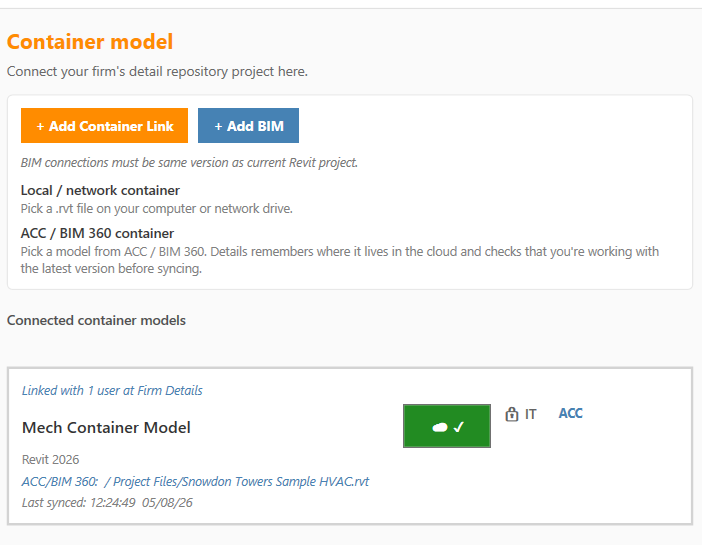
When the user opens Link Manager inside the Details Revit plugin, Details checks the firm's deployment settings and automatically determines which libraries should be available to that user.
The plugin:
1. Reads the firm's centrally managed deployment presets.
2. Checks which presets match the user's assigned disciplines.
3. Adds the appropriate container models to the user's connected Revit libraries.
4. Identifies those connections as IT or BIM-managed.
5. Automatically removes managed links when the BIM administrator removes the deployment or the user's discipline no longer matches it.
The result is a much cleaner BIM management workflow.
The BIM manager controls where approved Revit content comes from. The Revit user simply searches for and uses it.
Discipline-Based Revit Library Deployment
One of the biggest advantages of Details for multidisciplinary AEC firms is the ability to control who receives each Revit library.
A large MEP firm, for example, may maintain separate libraries for:
* Mechanical details
* Electrical details
* Plumbing details
* Fire protection details
* Structural details
* Architectural details
* Firm-wide general standards
Details allows BIM managers to deploy those sources based on discipline rather than forcing every employee to navigate every container used by the company.
A Mechanical engineer can automatically receive the Mechanical library. An Electrical designer can receive the Electrical library. A BIM manager or multidisciplinary employee can receive several.
This keeps the Revit environment relevant to the person using it while allowing the BIM team to maintain centralized control.
Deployment Control and Sync Control Are Separate
Details also separates two BIM management decisions that are frequently treated as the same thing: who receives a library and who can synchronize that library.
The Disciplines setting determines who receives the connection.
The syncPolicy determines who is allowed to synchronize the underlying source.
Synchronization can be configured for:
* Everyone
* Firm administrators
* Designated maintainers
The default can remain open to everyone, but BIM teams that need stronger governance can limit synchronization privileges without preventing users from accessing the library.
That distinction is important for larger firms.
An engineer may need to use an approved Mechanical details library without needing permission to manage or synchronize the source behind that library.
Details gives BIM managers control over both.
Stop Chasing Network Paths Across the Firm
One of the least productive responsibilities for a BIM manager is troubleshooting something that should have been standardized in the first place.
"Where is the detail model?"
"Which container should I be using?"
"Can you send me the path?"
"Is this still the current library?"
"Why doesn't my Details connection match theirs?"
These are small questions individually. Across an entire engineering or architecture firm, however, they create significant BIM overhead.
With Details, the BIM team establishes the connection once.
The firm's Revit users then inherit the correct libraries through their existing Details environment.
The workflow becomes:
BIM manager creates or updates a universal library connection → Details stores it at the firm level → each user's Revit plugin receives the appropriate connection → users search and place details from the same approved sources.
No spreadsheets of paths. No onboarding document explaining how to connect. No asking every employee to manually configure their Revit plugin.
Better Revit Standards Without Changing Where Your Details Live
A major advantage of Details is that firms do not necessarily have to abandon the Revit container models they already maintain.
Many BIM management platforms start by asking firms to restructure their existing content management process.
Details can instead act as the intelligent layer between the firm's existing Revit content and the people who need to use it.
If your firm's standard details are already stored in a Revit container model on the network, Details can work with that model.
If your team uses Autodesk Construction Cloud or BIM 360, Details can work with a synchronized cloud container.
That means BIM managers can improve how details are distributed, searched, organized, and used without immediately rebuilding years of existing BIM standards.
One Source of Truth for Revit Details
Consistency is one of the primary goals of BIM management.
If different engineers are searching different container models, using old copies of details, or maintaining their own local libraries, the firm's standards begin to fragment.
Details gives BIM managers a practical way to create a single source of truth for Revit details.
The BIM team determines which containers are approved.
Details distributes those containers.
Users search the same libraries.
When the BIM team changes the source, the deployment changes with it.
This makes it significantly easier to keep teams aligned around the firm's current Revit standards.
Faster Revit Onboarding for New Employees
Firm-wide deployment also improves employee onboarding.
Traditionally, a new Revit user may need instructions for finding company standards, connecting to network locations, locating container models, understanding folder structures, and learning which libraries belong to their discipline.
With Details, much of that configuration can happen automatically.
Once the employee belongs to the firm and has the appropriate discipline assigned, the firm's managed Revit libraries can appear within their Details environment.
Instead of teaching a new engineer where details are stored, BIM managers can focus on teaching them **how the firm expects details to be used.
That is a much more valuable use of BIM management time.
Centralized BIM Management Without Centralized Friction
Centralization is valuable only when it makes work easier.
A system that gives the BIM team complete control but adds additional steps for every engineer simply moves the inefficiency somewhere else.
Details is built around a different model:
Centralized administration with decentralized usability.
The BIM manager controls the library infrastructure from the website. Regular Revit users do not need to manage firm deployment settings. They simply receive the containers relevant to their work inside Revit.
Under the hood, Details maintains one shared firm-level deployment source rather than requiring a separate copy of the configuration for every user.
That makes the system easier for BIM managers to update and easier for Revit users to understand.
Why Details Is Built for BIM Managers
Details is more than a Revit detail search tool. It gives BIM managers a way to turn a collection of Revit details into a managed firm resource.
For BIM teams, that means:
Centralized Revit library deployment. Publish an approved container once rather than configuring every user's environment individually.
Discipline-based distribution. Automatically give Mechanical, Electrical, Plumbing, Structural, Architectural, or other teams the libraries relevant to their work.
Support for existing Revit container models. Continue using network, local, Autodesk Construction Cloud, and BIM 360 workflows instead of rebuilding the firm's entire detail infrastructure.
Firm-wide updates. Change a source once and manage the deployment from the same centralized preset.
Controlled synchronization. Decide separately who should receive a library and who should be allowed to synchronize it.
Better Revit standards. Keep employees working from approved sources instead of disconnected local libraries or outdated container models.
Simpler onboarding. New users can receive the appropriate firm libraries based on their role rather than manually configuring every connection.
Less BIM support overhead. Reduce questions about paths, container locations, setup instructions, and which library employees should be using.
Most importantly, Details removes one of the fundamental weaknesses of traditional Revit content management: a centralized library should not require decentralized setup.
A Better Revit Detail Management Workflow
BIM managers should be defining standards, improving workflows, maintaining quality, and helping their firms get more value from BIM.
They should not have to spend their time making sure 75 different employees have copied the correct network path.
Details turns Revit detail deployment into a firm-level BIM standard.
The BIM manager publishes the approved source once. Details determines which users should receive it. The Revit plugin automatically establishes the appropriate connections. Engineers and designers can then search, find, and place details from the firm's approved libraries without worrying about where those details physically live.
For firms using Revit container models, Autodesk Construction Cloud, BIM 360, or a combination of local and cloud-based detail libraries, Details provides a simpler way to connect BIM management standards directly to everyday Revit workflows.
One BIM team. One managed source. Every appropriate Revit user connected automatically.
That's what firm-wide Revit detail management should look like.
Frequently Asked Questions
What is the best way to manage a Revit detail library across a firm?
A Revit detail library should have a centrally managed source and a consistent method of distributing that source to Revit users. Details allows BIM administrators to deploy approved container models at the firm level so matching users automatically receive the correct library connection inside Revit.
Can Details work with existing Revit container models?
Yes. Details is designed to work with existing Revit detail libraries, including local and network-based container models as well as synchronized cloud containers in Autodesk Construction Cloud and BIM 360.
Do individual Revit users need to connect to the firm's detail library?
With BIM Team Deployment, administrators can publish the connection centrally. Matching licensed users then receive the managed container connection automatically through the Details Revit plugin without performing a separate claim or per-user setup process.
Can different Revit disciplines receive different detail libraries?
Yes. BIM administrators can target deployments by discipline. This makes it possible to distribute Mechanical, Electrical, Plumbing, Structural, Architectural, or other libraries only to users who need them.
Can BIM managers control who updates a Revit library?
Yes. Details separates library distribution from synchronization permissions. The discipline settings determine who receives a connection, while the synchronization policy determines whether everyone, firm administrators, or designated maintainers can sync the source.
What happens if a BIM manager changes or removes a deployed library?
The BIM administrator manages the deployment centrally. If the preset is removed, or if a user's discipline no longer qualifies for that preset, Details can remove the corresponding managed connection from the user's Revit environment.
Is Details a BIM content management system?
Details is a Revit-focused BIM content and detail management platform designed to help AEC firms organize, search, distribute, and standardize reusable Revit details. Its BIM management tools add centralized administration on top of the firm's existing Revit detail infrastructure.