Details vs. Pirros
AEC firms have spent years building valuable Revit details. The question is no longer whether those details should be reused. The real question is how much work a firm should have to do to make its existing Revit knowledge searchable, standardized, and accessible to everyone.
Two platforms approaching that problem are Pirros and Details.
Both help architecture and engineering firms find and reuse Revit details. Both offer Revit integrations. Both are designed to reduce the amount of time designers spend searching through old projects.
But the way they accomplish that goal is substantially different.
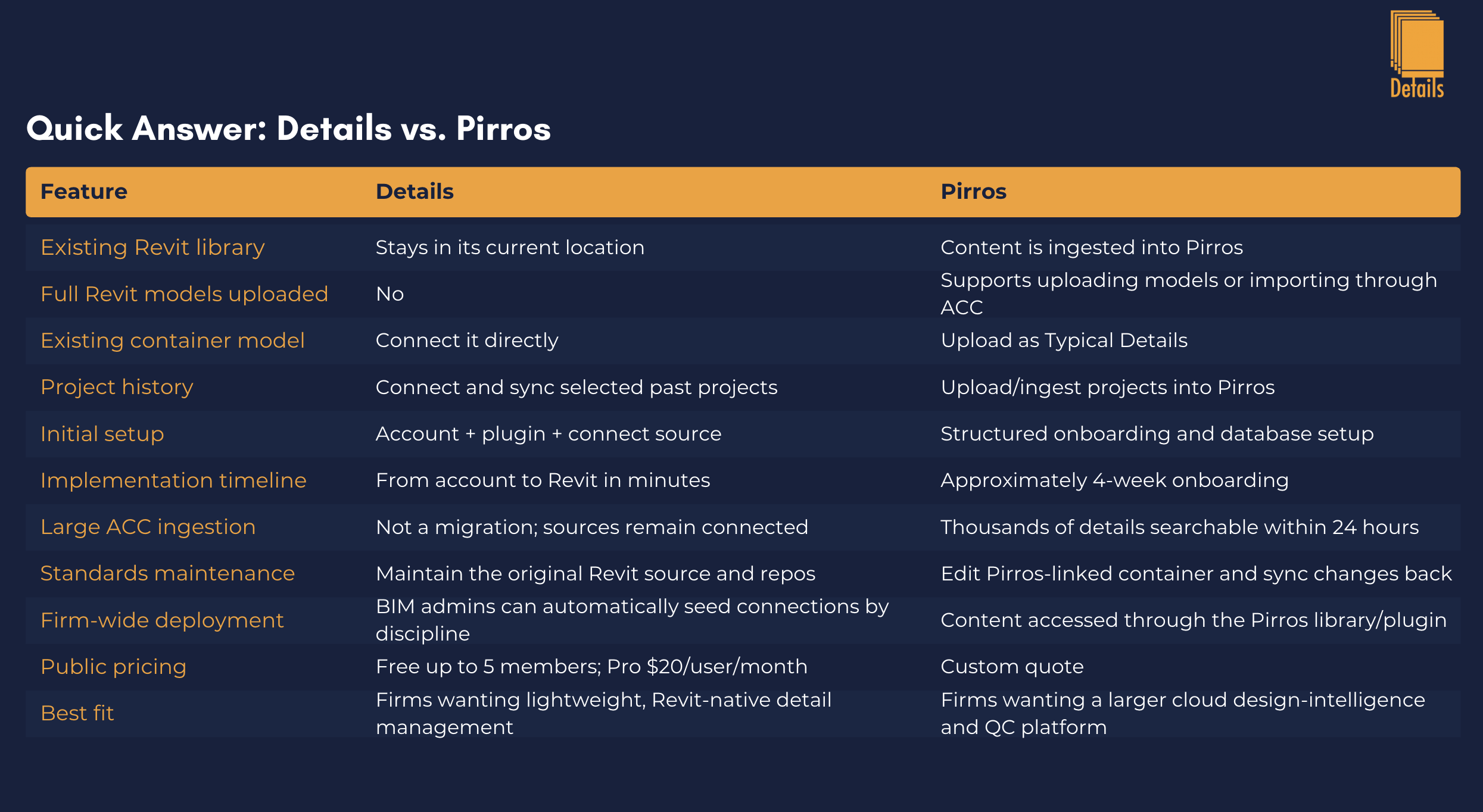
Pirros builds a cloud-based intelligence layer by ingesting project content into the Pirros environment. Details connects directly to the Revit models and container libraries your firm already uses, indexes the information needed for search, and leaves the authoritative Revit files where they are.
For BIM managers evaluating Pirros alternatives or comparing Revit detail management software, that architectural difference affects migration, implementation time, cost, maintenance, deployment, and ultimately how much your existing BIM workflow needs to change.
The important point is that migration speed and implementation speed are not the same thing.
Pirros may be able to ingest a large volume of ACC content quickly. Pirros states that thousands of details and families can become searchable within 24 hours after connecting Autodesk Construction Cloud. But its official onboarding documentation describes an average four-week implementation involving account setup, content upload, database review, workflow development, and full-team orientation.
Details takes a different route: there is no traditional detail-library migration in the first place.
How Does Migrating Revit Details Into Pirros Work?
One of the most important questions for a BIM manager evaluating Pirros is what actually happens to an existing detail library.
Pirros does not require BIM managers to manually export and upload every individual drafting view. That's an important distinction.
Instead, Pirros can ingest entire Revit models.
Its current administrator workflow allows firms to add Revit models from a desktop/server location or connect to Autodesk Construction Cloud and BIM 360. Pirros then extracts and indexes the details contained within those models.
For a firm that already has an established standard-detail container, Pirros's implementation instructions tell the BIM team to upload that Revit container as Typical Details. Pirros also recommends initially uploading at least five representative projects, configuring project parameters, adding organizational tags to the typical library, and reviewing/vetting the standards.
So the migration process is more accurately described as:
Connect or upload Revit sources → Pirros processes their content → classify the standards container as Typical Details → configure project information → organize and vet content → roll the system out to users.
This is considerably better than manually migrating hundreds of individual details.
But it is still an implementation process.
How Long Does Pirros Migration Take?
This is where marketing claims about "24-hour migration" need some context.
Pirros says that firms using its direct Autodesk Construction Cloud integration can get thousands of details and families onto the platform and searchable within 24 hours.
That is the content-ingestion timeline.
The full organizational rollout is longer.
Pirros's April 2026 onboarding documentation describes a four-week onboarding program. Weeks one and two cover account setup, permissions, initial Typical Detail uploads, and database organization. Weeks three and four cover workflow development and team rollout. The program includes four required sessions of roughly 45 minutes each, along with action items for the firm's implementation lead between milestones.
Pirros's separate implementation plan for firms with an existing Typical Detail library similarly sets database population for approximately two weeks after kickoff, workflow development for week three, and user rollout around week four.
And if the firm does not already have a standards library, the process can be substantially longer. Pirros publishes an implementation path that targets creation of the standards library roughly eight weeks after kickoff, involving project uploads, review stashes, PDF redlines, Revit cleanup, standardization, and promotion back into the Typical Details library.
That doesn't make Pirros slow. It shows that Pirros is implementing something larger than a simple Revit search plugin.
For some organizations, that structured implementation may be exactly what they want.
For others, particularly smaller and midsize engineering firms, it may be more infrastructure than they need.
Details Takes a Different Approach: Don't Migrate the Library
Details was designed around a simpler question:
What if the firm's existing Revit library doesn't need to move at all?
Details connects to the files your firm already trusts.
That could be a Revit container model stored on a local drive, a network server, BIM 360, Autodesk Construction Cloud, Forma, or a collection of past projects.
The authoritative Revit model stays there.
Details parses the model locally and synchronizes only the thumbnails and metadata required to make its drafting views searchable and accessible. Full Revit models, project files, and model geometry are not uploaded to Details.
For the BIM manager, that changes the implementation equation completely.
You don't need to ask:
"How do we move our library into Details?"
You ask:
"Which libraries should Details connect to?"
That is a much smaller decision.
Your Container Model Remains the Source of Truth
This becomes particularly important when standards change.
With Details, the firm's existing container remains the authoritative Revit source.
The BIM manager continues editing the same Revit drafting views using the same file-management process the firm already understands. Details makes those sources searchable, organizes them, and connects users back to them.
There isn't a separate cloud master of the actual Revit model that now has to become part of the firm's standards workflow.
That is one of the core design philosophies behind Details:
Improve the firm's Revit library without replacing the firm's Revit library.
How Pirros Handles Ongoing Detail Maintenance
Pirros has a sophisticated version-management workflow, but BIM managers should understand how that workflow operates.
Pirros's current documentation instructs administrators updating Typical Details to open the container model downloaded from Pirros, make the changes in Revit, and use the Pirros plugin to sync those updated details back into the platform. Pirros uses its own IDs to associate that detail with the existing cloud record.
That ID relationship matters.
Pirros specifically warns that editing a different copy of the container can cause the system to create a duplicate instead of recognizing the edit as an update. The recommended workflow is therefore to maintain the Pirros-linked version of the container when editing standards.
Once synchronized, Pirros creates a new version with a change history.
Users who previously downloaded the detail into an active project within the prior year can receive a notification that a new version exists. However, Pirros notes that the notification does not automatically update the Revit model where the older detail was already used; the user can choose to download the newer version.
This is a strong workflow for firms that want formal cloud-based detail versioning, review, approval, and notification.
But it also means Pirros becomes part of the firm's standards-maintenance process.
How Maintenance Works in Details
Details is intentionally more lightweight.
The Revit source remains under your control.
If the BIM manager updates a drafting view in the firm's container, the source itself remains the source. Details can then resync the information needed for the searchable library.
There is no requirement to maintain a separate master model created specifically for the Details platform.
This is especially valuable for firms that already have mature BIM procedures surrounding their container models.
Instead of introducing a second standards workflow, Details extends the existing one.
Firm-Wide Deployment Is Where Details Gets Especially Interesting
Connecting a container is only half the problem.
The other half is getting 20, 50, or 200 Revit users connected to the correct source.
Traditionally, BIM managers solve this with documentation:
"Use this network path."
"Connect to this container."
"Mechanical uses this model."
"Electrical uses that one."
"Don't use the old container."
Details' BIM Team Deployment tools turn those instructions into software.
An administrator can publish a container connection once from Firm Library → BIM Team → Deployment.
The BIM manager can target that connection to specific disciplines such as Mechanical or Electrical, or publish it to the entire firm.
When matching users open Link Manager in Revit, Details automatically seeds the BIM-managed connection into their environment.
There is no per-user claim process and no need for every employee to manually copy the same network path.
Details publicly describes this capability as allowing BIM administrators to create universal container links that automatically seed into member connections and can be targeted by discipline.
That makes the workflow:
BIM manager controls the source → Details controls distribution → engineers simply use the library.
For many firms, that may be more valuable than moving the library itself.
Pirros vs. Details Pricing
Pricing is another significant difference between the platforms.
As of August 2026, Pirros does not publish a fixed standard subscription price on its website.
Pirros states that pricing "varies greatly depending on the needs of your organization" and directs prospective customers to request a custom quote.
Its Master Subscription Agreement also establishes authorized-user limits through the customer's order form. Additional authorized users can be added during a subscription period and may require additional prorated subscription fees.
That makes an exact Pirros-vs.-Details price comparison impossible without an actual Pirros proposal.
Details takes a transparent pricing approach.
As of August 2026:
Details plan Published price
Free $0 for firms up to 5 members
Pro $20 per seat/month
25+ Pro seats 10% volume discount
Details also includes unlimited detail-library storage on the Free plan, while Pro adds unlimited firm members and unlimited AI assistant requests.
A 20-person firm therefore does not need to schedule a sales call to determine the basic subscription economics.
It can calculate them before creating an account.
The Hidden Cost: BIM Management Time
Software cost isn't only the subscription.
There is also the time required to implement and maintain the system.
For Pirros, that investment is intentional. Pirros explicitly markets structured implementation, training, workflow development, quality-control processes, and ongoing customer-success support as part of its offering.
For a 500-person architectural organization trying to consolidate decades of fragmented project knowledge across many offices, that may be extremely valuable.
But a 40-person MEP firm with one well-maintained container model may not need to re-engineer its content-management process.
It may simply need its engineers to find that content faster.
That's the market where Details is particularly compelling.
When Pirros May Be the Better Choice
Pirros is an impressive platform, and there are situations where its broader approach makes sense.
A large architecture or engineering organization may have thousands of historical projects containing valuable knowledge but no usable central library.
Pirros can ingest that project history, use AI and computer vision to make content searchable, identify commonly reused details, facilitate review and vetting, create formal Typical Detail workflows, provide markup and PDF collaboration, track usage, and help a BIM team gradually develop standards from historical project work.
If your goal is to build a broader design-intelligence platform around years of historical project content, Pirros deserves serious consideration.
It is trying to solve a larger problem than simply finding a drafting view.
When Details May Be the Better Choice
Details becomes especially compelling when the firm's problem is not a lack of standards.
The standards already exist.
The container already exists.
The BIM manager already knows how it should be maintained.
The problem is that nobody can find anything quickly.
In that scenario, migrating your existing BIM infrastructure into another platform may be unnecessary.
Details lets firms keep their Revit sources where they already live while providing:
Revit-native detail search and placement
Connected container models and past projects
AI-assisted detail discovery
Firm Library organization
Detail sharing
Firm folders
Sheet templates
BIM-managed firm-wide deployment
Discipline-targeted container connections
Transparent pricing
Details is therefore particularly well suited to small and midsize AEC firms that want better Revit detail management without implementing an enterprise content-management program.
Details vs. Pirros Is Really a Question of Architecture
At first glance, Details and Pirros look like direct competitors.
Both make Revit knowledge searchable.
But the architectural philosophy behind each product is different.
Pirros asks: How can we ingest a firm's project history and turn it into an intelligent cloud knowledge system?
Details asks: How can we make the firm's existing Revit knowledge instantly accessible without changing where that knowledge lives?
There is value in both approaches.
The better choice depends on whether your firm wants to build a new intelligence system around its content or make its existing BIM system dramatically easier to use.
For many engineering firms, especially firms with established Revit container models, Details offers the shorter path.
No major migration.
No rebuilding the library.
No four-week implementation required before the concept makes sense.
Connect the files your BIM team already trusts, deploy those connections across the firm, and let engineers search the library from the software where they're already working.
Revit.
Frequently Asked Questions About Details vs. Pirros
Does Pirros require manually uploading every Revit detail?
No. Pirros can process entire Revit models and can integrate with Autodesk Construction Cloud/BIM 360. It extracts and indexes details from those project sources rather than requiring every detail to be uploaded individually.
How long does Pirros implementation take?
Pirros states that thousands of ACC-hosted details and families can become searchable within approximately 24 hours, but its complete onboarding program averages four weeks. Firms without an established standards library may have a longer standardization process.
How much does Pirros cost?
Pirros does not currently publish standard pricing. The company provides customized pricing based on an organization's requirements.
How much does Details cost?
Details currently offers a Free plan for firms with up to five members and a Pro plan for $20 per seat per month, with a 10% volume discount for purchases of 25 or more seats.
Does Details require migrating a Revit detail library?
No. Details connects to existing Revit container models and previous projects. Model parsing occurs locally, while thumbnails and searchable metadata are synchronized to the library. Full Revit project files and model geometry are not uploaded.
Which is better for a BIM manager: Details or Pirros?
It depends on the firm's goal. Pirros offers a broader cloud-based project-intelligence, standards, and QA/QC system with structured implementation. Details is a lighter-weight option for BIM managers who want to retain their existing Revit libraries, make them searchable, and automatically distribute approved sources across their firm without rebuilding their content-management workflow.
The Bottom Line
Pirros has built a powerful platform for extracting intelligence from a firm's project history.
Details takes a deliberately different approach.
Your firm has already spent thousands of hours building its Revit library. We don't think you should have to migrate it somewhere else just to make it useful.
Keep the container.
Keep the project files.
Keep the BIM workflow your team already understands.
Connect Details to it.
Then make every detail your firm has already created searchable, shareable, deployable, and useful from inside Revit.
That's the difference between moving your Revit library and making your Revit library better.